Monday, October 17, 2016

Earn 1$/More for Every App Review


So, there's a new service called Apperwall that pays you money for every app review.
Firstly, there's a new app to review almost every day.
You earn the full amount of money for the app review based on the quality of the review.
So far, I've received the full amount of money for all my app reviews.
You can earn 1-2$ per app review.
You require PayPal for payment.
$0.50 is the minimum payout.
After downloading an app, wait at least 12 hours for them to process your review and provide the money for the cashout.

Payouts are done within 9-24 hours.


If you ar not from US:
I'd highly recommend using a USA VPN for the best offers.


Steps:
Signup
Download app
Use app for 2 minutes
Write review
Wait and get paid.
(USE A USA VPN)


*Supports both iOS and Android*
*Please use my ref link*


Friday, October 14, 2016

BitWalking: generate money by walking?

BitWalking just released its app (Android only for now), it can be downloaded here:

https://play.google.com/store/apps/details?id=bitwalking.bitwalking


The app seems to be in its early stages so there aren't lots of features or details yet.
You can try it out, start harvesting steps and generating Walking Dollars (W$) in the meantime.

Link to BitWalking's FAQ: http://www.bitwalking.com/faq/


What you do think about this, guys? Have you tried it yet? :)

StackSocial - Share with friends and make money.


StackSocial is an online marketplace filled with gadgets, apps, tools and toys.
You can find everything from drones to current video games to instructional courses on popular software.


Headquartered in Venice Beach, California, StackSocial has been supplying geeks with gear since September of 2011. Their team hand-picks every item on the site, working around-the-clock to find unique, interesting products.

StackSocial Items and Prices:

StackSocial states on their site that the reason they are able to offer such great deals is because manufacturers of the items find it beneficial to reach StackSocial’s community of 400,000 geeks, so they’ll lower their prices in order to reach that market.

Items for Sale:

There are definitely cool items on StackSocial that can’t be found on other “geek” sites. The drone is on the high end, but there is also a program called Motion Artist, which lets you make your own motion comics. You can also buy PC and Mac games for cheap – The Walking Dead game, including the 400 Days DLC, is only $14.99.
StackSocial - Handpicked apps, gadgets and tech tools...

Criticism of StackSocial.com:

Generally, customers have a good experience, although it’s possible to find complaints online. StackSocial’s community is 400,000 geeks strong, and the extended StackSocial network reaches 3 million people, so some complaints are going to be pretty normal.

A few complaints center around issues typical to any company involved with a lot of shipping: lost packages, delays and the like. However, most of StackSocial’s inventory is virtual. With digital downloads, your product is delivered to you instantly and you don’t have to deal with shipping at all.

The bulk of complaints actually center around certain manufacturers, not StackSocial. It’s unfortunate that StackSocial fronts the blame, when they really have no control over the issue.

Now you tell, how can I make money out of this, well too simple:

Share your referral link with friends and earn $10 credit upon their first purchase.


GOOD LUCK to EVERYONE!! :D

YouTube - How to get Partnered with Fullscreen!

This guide will teach you how to create a YouTube account that will successfully get partnered Fullscreen.
I have partnered over 20 accounts with Fullscreen, and done this everytime, and it has worked 100% of the time.

NOTE : I can NOT guarantee that it will work 100% of the time for everyone else, since there are many different variables in play here. (What country you live in, what type of channel/what type of content you are uploading, etc.)


The following is a guide of what I have done to get my channels partnered everytime!


Mentioned in Guide :

Recommended Stats To Get Partnered With Fullscreen :

1. YouTube account must be at LEAST 30 days old.
2. YouTube account must have received at LEAST 100 views per day for the past 30 days.
3. YouTube account must have received at LEAST 1,000 subscribers!


FULL Guide WITH Pictures below!!


Step 1:
Make a new YouTube account, or use an old one :)

The main thing to keep in mind here is that Fullscreen will NOT partner you unless your account is at LEAST 30 days old. What I mean by this is, you must have create your channel at LEAST 30 days prior to applying to get a partnership.
(This requirement is NOT stated anywhere by Fullscreen themselves. I have done multiple tests to verify this statement. I created 3 different accounts, and did the SAME thing to each account, HOWEVER, I applied for partnership on 1 account after 15 days, 1 account after 25 days, and one account after 30 days. The first two accounts got denied, but the third one got accepted :) )


So, having an account that is at least 30 days old is 100% required. (Obviously, if you are not botting views etc, you can probably get partnered before 30 days, but this guide is for people who are botting etc )

Step 2:
Upload YouTube videos to your channel and get views on the videos.
This is what I recommend doing. (NOTE : Doing everything in this step isn't required, but it's what I recommend if you want a guaranteed partnership. The only reason I say it's not all required is that you don't have to send this many views to the videos, it's just my recommendation. Everytime I've sent this many views, I have always gotten a partnership. If I sent about 75% as much, it was really hit or miss. Sometimes I would get the partnership, sometimes I wouldn't. So, I recommend you send as many as I suggest.)

So, I suggest you do the following :
Create at LEAST 10 videos. These videos don't need to be long videos, they can be just 1 minute long videos. Also, they don't need to be 1080p, but I 100% recommend uploading 720p videos. This does NOT mean that it has to be crystal clear quality, just make sure the pixel ratio is 1280x720. Lastly, I 100% recommend that you upload your OWN content. Don't steal videos from other people because it could result in getting a strike on your channel which will mean you won't be able to get partnered. ALSO, when you eventually get partnered, and are ready to monetize these videos, if you copied someone else's videos, and they see it, they can "claim" your videos, and the money you earned will be given to them.


Once you have the videos uploaded, you are ready for step 3 :thumbs:


Step 3:
Send views to your YouTube Videos.
To do this, the easiest way would be to use Hitleap. I recommend Hitleap because they allow you to limit the amount of hits you send per hour, which is exactly what we need!

Once you have a Hitleap account, it's now time to start sending views.

When I do this part, I always set the Hitleap view settings to the following :


I set it to stop traffic after 500 hits because it'll make sure you don't lose all your minutes over night :p

Also, set maximum hourly limit to 5. This will ensure that your views don't get reset, and that when they hit 301 views, they'll stay there and not reset to 0.

You're going to want to make sure you do this to all of your videos, but if you don't want to buy extra slots on Hitleap, just send views to a video for a few days, then switch to another video etc.

HOWEVER, I recommend that you at LEAST get 100 views per day. So, whether you are going to send 100 to one video each day, or 10 to each of your 10 videos each day, get at LEAST 100 views across the board each day.


Step 4:
Now, it's time to start getting subscribers.
At this time, you have uploaded your videos and have started sending views to them via Hitleap (or your favorite traffic exchange).

At this point, it's really up to you how you get your subscribers. I recommend at LEAST 1000 subscribers, but I have gotten a channel partnered that only had 580 subs :shrug: (I think I got lucky on that account, I wouldn't chance it.

You can get your subscribers from anywhere, but I recommend at LEAST 1,000 subscribers.


Step 5:
Once you have completed all steps up until this point, you are now ready to get partnered
At this point, you should have completed the following :

1. YouTube channel at least 30 days old ✔
2. YouTube views 100+ Views per day for 30 days ✔
3. YouTube subscribers 1,000 + subscribers ✔

At this point, this is what your YouTube channel should look like :


NOTE : Keep in mind, your results won't be exactly the same as mine! You won't get the same amount of views, or the same amount of minutes watched etc. Your stats WILL be different. Just stick to the 100 views per day, 1,000 subs, and at least 30 days old, and you're good to go!


Step 6 :
Apply for a partnership with Fullscreen! http://www.fullscreen.com/apply/


Step 7:
Wait about 3-5 days, and you will get partnered :smile:


Step 8:
Make sure you monetized your videos now! :smile:
Once you have monetized your videos, you will be allowed to earn money on your videos!
Once you have monetized your videos, this is what it should look like! :thumbs:


When a YouTube video is successfully monetized, the Money sign will be White with a Green background :smile:


That's it guys! I've used my method over 20 times and have gotten partnered EVERY time :smile:

I hope this method helped you guys, and if you have any questions, leave a reply :D

I hope I was able to enlighten everyone with this method, and hopefully I answered everyone's questions.

It took me quite a bit of time to make this guide, so I hope I helped a lot of you :smile:


GOOD LUCK to EVERYONE!! :D

GUIDE $25/DAY - Have more than 5,000 followers on Social Media?

It's been almost 4 months since i started my journey monetizing my social media channels and i would like to share my story with you and guide you as well. As an undergraduate student, i had to move to a new town and start my life there while studying business administration.

Though, my parents had a very hard time helping me financially, so i had to find a job to pay my rent for the next 3 years.

While i was studying, i had a lot of free time to spend on the internet and my roomate was obsessed as well with social media channels so we started an account together about fitness motivation both on Instagram and Youtube.

We spent a lot of time following-unfollowing, posting on daily basis etc. and we gained around 7k-8k followers in less than three months.

That was a big deal for us and we felt like we could start selling promotion posts to make some extra cash. We searched around the internet but we had a little success since 8k followers on a over-saturated niche maybe wasn't that catching at all.

One day, a fellow student in our class told us about Famebit, a Marketplace For Influencer Marketing and we registered in no time.

The point was to sent a proposal and get accepted but didn't have high hopes since our following was too low. Though, i was always very strict about writing reports and correct grammar, so i was writing for over 3 days the perfect proposal template.

It was a really good one, and i was very satisfied with what i had done, if a was a sponsorship i would probably hire me as well. Starting on March 2016 we had made our first $250 in less than a month, with less than 10k followers. Since then, we kept growing our accounts reaching an audience of 58k by this time.


That was the outcome few days ago:


And the most recent payment proof:


Guide & Tips


1) If you don't have the required amount of followers you can start growing your accounts. I recommend to not buy fake followers, it will do more bad than good to your future growth on Famebit but if you are less than 1k followers away you could use seoclerks to speed up the process.

2) The niches that work best with Famebit are Beauty & Fashion, Gaming & Apps, Health & Fitness, Pets and Technology.

3) Make sure your accounts look professional and eye-catching. Appearance plays a big role. Choose or change your username to something interesting that represents your niche and carefully write your descriptions and the extra info. Emoticons help a lot and are pretty. Make sure to delete bad or unrelated posts and also those with low engagement.

4) Before you send your first proposal, make sure to create 5-6 posts that are of high quality, and contain a description well-written without grammatical errors. For me, after i created a post i was heading either to seoclerks or automatic like tools( there are too many, you can google them) and was buying some likes/comments/views that helped boost my posts and make them look engaging. This also helped me gain more followers as well.

5) The biggest and most important part is the proposal itself. Writing a great campaign proposal takes more time and effort but it's absolutely worth the time spent. I recommend to take time and write a proposal that if you were the one that read it, you would hire the person that sent it. I have a template to suggest, but the best thing is to take it and make the appropriate changes that will help you get the job.

Tips for a good proposal:
1. Research the seller. Take the time to learn something about the brand and make sure you customize your proposal to show that to the brand.

2. Explain why their product or brand will be a great fit for you channel and audience. If you have a smaller subscriber count this is the perfect time to sell yourself and your channel.
Give them the average likes/comments/favourites your posts get and mention why you think their product will get the maximum exposure. You can also offer a small extra just to show that you're going to be generous if they choose you. Better, stick to permanent posts.

3.Only at the end, you should mention your followers number and make clear they're all targeted and active. Thanks them for their time and tell them you look forward for a long time relationship, it will make clear that you offer quality and you're sure they will be satisfied.

4. Don't forget: Good grammar and professional vocabulary always catch the attention! Mercilessly edit the whole thing before you send it. Repeat the process.

5. DON'T send the same proposal to multiple people. You could end up losing a sponsorship just because someone is selling two or three products and got three similar messages of you. Try to make them look different and appropriate for each case but the main point could stay the same.

After your get accepted, do your best to satisfy their expecations. In the meanwhile, grow your accounts more and more and don't hesitate to use the ''collaborations'' feature that will help you grow even faster your following!

Thursday, September 1, 2016

SolidViews - a new traffic exchange

SolidViews is a new traffic exchange that not only bring views to your websites, but it can simulate clicks also. This can be a powerful tool if used correctly.

You can join here: http://solidviews.com

This thread is dedicated to methods you can use to make money using SolidViews. You can also specify extra options for when viewers visit your website, such as: 
  • Unique IP (BY day, week, month, or one time only) 
  • Custom Referrer (Can choose more than one and it will randomize) 
  • Hourly Limit 
  • Total Limit 
  • Dynamic timer up to one hour 
  • Clicking 
  • Custom Pathing (Coming Soon)

The way it works is that for every point you receive, you receive one second of view time. So 30 points will equal 30 seconds to your site. If you want something on your website clicked, it will cost 15 additional points.

Another thing I really like is the privacy. None of your websites will be visible to the viewer. Everything is ran behind the scenes.

So far, the website is pretty new so there aren't much users. But I did end up making about $10 in one day from multiple methods.

Basic Tutorial On How The Viewer Works (Must Maximize)

CPC ,CPM/Traffic and Popunder Traffic Exchange $$$

We all need $$$ whether through CPC sites or CPM or PPC or Popunders.

CPC is?
Cost Per Click (CPC) refers to the actual price you pay for each click in your pay-per-click (PPC) marketing campaigns. In this lesson you'll learn:
sites like adf.ly are both CPM and CPC at the same time.

Have you tried all traffic exchanges and none work for you.
You keep getting banned etc.
Well here is the Ultimate traffic exchange.

Here is a short tutorial. 

Also works for banner ads but needs tweaking around.
This guide is a generic guide feel free to experiment with different values.

requirements :
1. dot net framework 4.5
2. Windows OS [same steps like hitleap Traffic Exchange]

1. Sign Up to this site: Bobsbot.net


2. Download the Bot ['Viewer'].


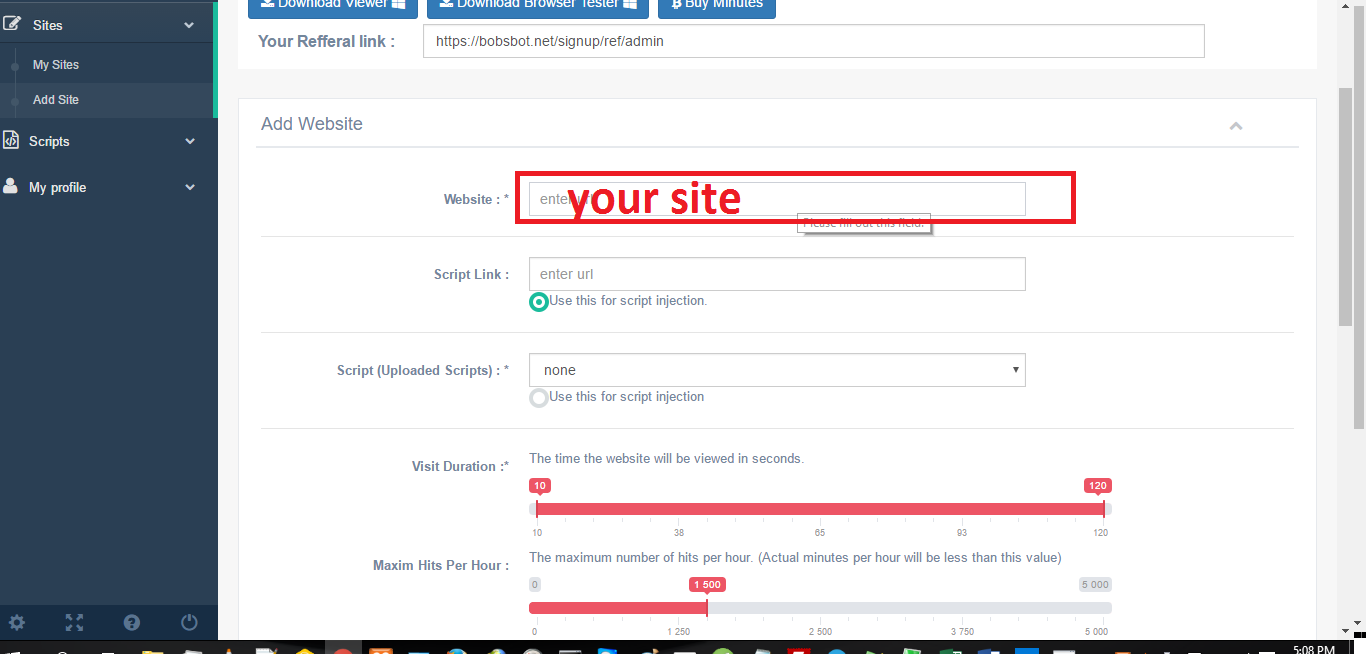
3.Add your site:

4.Visit Duration [self explanatory] 

5.Most important part {for CPM sites skip this step} 

-Enable mouse clicker box should be checked.
-Anchor point leave default
-Click trigger time :{time after page is loaded when the click should be triggered}
this value is a range. the viewer will select a random time between the highest value and lowest value. E.g if Click trigger time is 10-15 then the viewer will select a random time between 10 and 15 seconds... for example the viewer will trigger the click at 12 seconds after the page has loaded. Therefore the maximum value 15 should not be more than the time spent on the page [Visit duration minimum time].

-Mouse X: These are mouse X coordinates to where the popunder is triggered. If it is a full page popunder choose a random range e.g 300 - 500
-Mouse Y: These are mouse Y coordinates to where the popunder is triggered. If it is a full page popunder choose a random range e.g 300 - 500

-Mouse X: These are mouse X coordinates to where the CPC button is triggered.
-Mouse Y: These are mouse Y coordinates to where the CPC button is triggered.
-Then click submit.

6. Download viewer. 

Earn minutes and your site will get traffic that clicks your site.

Spoiler: Error for Can't start
Solved: Follow everything in this article:https://techsupport.osisoft.com/Troubleshooting/KB/KB00747

This includes errors in windows server. it seem when .Net frame work 4.0+ installs on some Operating Systems it doesn't add Service park framewroks 2.0 and 3.5 .The above guide will help you solve errors for each affected OS.

For more advanced users:
I will simplify the content below on other posts.
{Everything below is for custom solutions and advanced users}
Download the browser to test out mouse features and script features. The browser will help in understanding how the viewer works.

The browser tester will also help in getting mouse coordinates and testing javascript script.
The script below is for clicking through the script function. [A little knowledge of Javascript is needed to understand the script below]
function clickerf(){
    var element = document.getElementById("div1");
    if ("click" in element){
                element.click();
    }else if ("dispatchEvent" in element) {
     
        var evt = document.createEvent("MouseEvents");
        evt.initMouseEvent("click", true, true, window,0, 0, 0, 0, 0, false, false, false, false, 0, null);
        element.dispatchEvent(evt);
    }
 
}


setTimeout(clickerf,5000);

Make money with credhot PTC on auto

I am making this guide a somewhat compensation to those who have been waiting for the new viewer on the BobsBot.net You will have to wait longer. I have been jumping through multiple browser APIs.It takes time to find one that works and implement correctly.

{Update : Credhot has changed Registration Process. New users are put into a waiting list.I have no idea for how long}

Now here is the guide. 

  1. Sign up for a coinbase account at https://www.coinbase.com 
  2. Then login with your coinbase account at https://credhot.com.[similar site to adf.ly
  3. Create a link on this page: https://credhot.com/content

4.copy the link shown below

5.Add link to traffic exchange with the following settings.

Website: your credhot link
Refferer:choose any but not none
Duration :10-15 seconds
mouse enable=checked
anchor=top left
mouse x =50-490
mouse y = 31-100
Click trigger time :0-9
then submit
[see image for example]

The other settings leave as default.
6.run the viewer from the traffic exchange to earn minutes.


see my this thead on more info about viewer installation.
http://cashlootmethods.blogspot.com.ar/2016/09/bobsbotnet-viewer-30-released.html
PAYMENT withdrawal can be requested daily at https://credhot.com/balance

PAYMENT Proof

Bobsbot.net Viewer 3.0 Released

The following features are now included.
  • Downloads are disabled.
  • Javascript popups e.g “Are you sure you want to leave this page? [Yes] [No]” and others are now disabled.
  • Popup windows are disabled.
  • Works on any platform :Windows , Linux , Mac
(Your VPS will work)
Cons of the new update.
None. All features work including mouse clicker using mouse coordinates.
Here is how to install it on Windows:
1. Download this file from here:Bobsbot Viewer 3.0
2. Download this browser{it is a similar browser to Chrome}      :https://download-chromium.appspot.com/
3. Unzip the file and open chrome.exe

4. Open this link in the browser. “chrome://extensions/”
5. Drag and drop the downloaded file “bobsbotviewer.crx” to the browser.


6.Accept the install prompt.


7.Enter username in page that was 
opened.(if page has not been loaded, restart the browser)
 8.Click Start.
Thats all.
Linux and Mac Guide :
Its time to utilize that VPS of yours.
Steps:
1. Download this file from here: Bobsbot Viewer 3.0
2. Download google chrome athttps://www.google.com/chrome/browser/desktop/
3. Open this link in chrome. “chrome://extensions/”
4. Drag and drop the downloaded file “bobsbotviewer.crx” to the browser.
5. Accept the install prompt.
 6. Enter username in page that was opened.(if page has not been loaded, restart the browser )
 7. Click Start.
If you have chrome installed (especially for Mac and Linux users) remove any extensions that you have they may interfere with running with the bot.
Thats all.


[Adfly] Auto Bot | Traffic exchange $$$

This a guide for Adfly for Bobsbot.net. 

Please read this first: 

Slow hits as of now: 

Have you tried all traffic exchanges and none work for you. 
You keep getting banned etc. 
Well here is the Ultimate traffic exchange
Here is a short tutorial. 
This guide is a generic guide feel free to experiment with different values. 

Requirements : 
1.A computer with internet (Windows,Linux or Mac will work) 
2. Fresh(New) account of either adfly or linkbucks-> just incase you get banned (1% chance) you have nothing to loose [same steps like hitleap Traffic Exchange

A. Sign Up to this site: Bobsbot.net


B. Download the Bot ['Viewer'].


Using a script to automate button clicking.

C. Add your site:

Website : http://adf.ly/1dbBvP
Script Link :https://rawcdn.githack.com/updatesvc/adfly/master/link2.js
{The script link will automate clicking of the skip ad button.}
-referer should be youtube but you can try with other values.


D.Visit Duration 

Recomended minimum time = 25
Maximum any value
e.g
25-25
25-30
25-35
- Maximum hits per hour = 20 {Adjust this value cautiously: high values can get you banned}
-Then click submit.

Thursday, June 4, 2015

XtendAdvert Review

XtendAdvert is an online advertising company which was started in 2011.  XtendAdvert generally offers two kind of advertising which includes banner advertising and URL shortener service. So, it provides a better opportunity to its users to earn money. As XtendAdvert serves two kinds of advertising so having a website to signup on XtendAdvert is not necessary. If you do not have a website even then you can earn money from them by using their URL shortener. However, if you have a website then you can generate maximum profit from them as you do not have to use other URL shortening service. XtendAdvert uses CPC, CPM model to pay its users. From the overview, this ad network looks great but lets have a deeper look of this network to see its pros and cons:

Sign Up And Approval:

Signup is very easy on XtendAdvert. For signing up on XtendAdvert you don’t need a website, if you have an email account then you can signup on this network. There is quick and instant approval or you can say that no approval is required on XtendAdvert.

Ad Types:

Ad types which they call places, basically they offer various ad formats, which are, banner, interstitial, DHTML Popup and Pop Under (Site Under). You can customize these ads according to your needs as there are many customization options available on the ads editing page.

Reporting System:

Their reporting system is also good which shows number of running ad units, impression, clicks, clicks and impressions ratio, number of referred users, amount paid, amount unpaid etc. However, they do not have an earning chart so you can only see your stats in tabular format. Also, their reporting system shows the real time stats about impressions and clicks. However, the earnings are updated once in a day.

Minimum Payout:

Minimum amount required to cashout your income on XtendAdvert is only 1€, as they pay in euros. So if you are a small or medium publisher then you can use this network to earn a good income from them. Large publishers can also make huge income from this network as they pay huge amount too.

Payment Frequency:

XtendAdvert Pays its users on monthly basis so if you have accumulated the minimum amount required to cashout in December then you will be paid in January.

Referral Program:

Their referral program is not very attractive, however, they say that they are currently working on it. So here’s the detail of current referral program:
If you refer a person to XtendAdvert then you will get 1€ for each person you refer, but it will be paid only for active users.

Pros:

  • Fixed CPM rates.
  • Offers both banner advertising as well as URL shortener service.
  • Minimum payout is only 1€.

Cons:

  • Referral program is not attractive.
  • Monthly payments.
Thinking Of Joining This Network:
http://www.xtendadvert.com/refer/editeur/5355

EARN MONEY WITH ADHEXA

Adhexa has high CPM rates for publishers as its the premier CPM ad network providing quality traffic for advertisers.

https://www.adhexa.com/?ref=BXnAxOQYdi%2FF3j%2Fp00Jh47txsY4TTB4LdtxLFo0MWxo%3D


The Adhexa dashboard is pretty simple. As soon as you log in you will see the dashboard with earning. They Provide real-time reporting for your inventory base on Date, Revenue and CPM. High Performing Platform with Easy Tools with out Drop data.

More than 3000 active ad campaigns worldwide and offer High CPM rates among ad networks. For Banners,POP and Direct Url ads.
Adhexa has an automatic ad campaign optimization system by country and by site for Make Best Revenue for your inventory.
Ad Sizes are 468×60, 728×90, 160×600,120×600, 300×250, 336×280

Payout:
The payment terms are pretty simple as they pay on weekly upon request, supports Paypal, Skrill and Ware. Payment Threshold is $5